Secure Proposal Sharing: Share Benefits Comparisons with Clients
The proposal is ready. Now what? Email attachments get lost. PDFs become outdated. Screen-shares require scheduling. Modern sharing tools let you send an interactive link that stays current, tracks engagement, and looks professional.
The Problem with Traditional Proposal Delivery
Benefits brokers have historically delivered proposals through:
- Email attachments: PDFs or Excel files that get buried in inboxes
- In-person meetings: Effective but scheduling-dependent
- Screen shares: Real-time but no persistent artifact
- Printed decks: Professional but immediately outdated
Each method has trade-offs. Email attachments work asynchronously but lack interactivity. Meetings work for discussion but require coordinating schedules. None provide ongoing access to an always-current comparison.
What Modern Sharing Looks Like
Modern proposal sharing combines the best elements: a shareable link that provides:
- Interactive access: Clients explore plans at their own pace
- Always current: Updates you make appear instantly
- Access control: Restrict who can view and for how long
- Engagement tracking: See what plans clients viewed
- Professional presentation: Branded, polished interface
Why Interactive Links Beat PDFs
When clients receive a PDF, you have no visibility into what they actually looked at. With interactive links, you see exactly which plans got attention—invaluable intel before your follow-up call.
Share Link Types and When to Use Them
Public Links (Anyone with Link)
The simplest option. Anyone with the URL can access the proposal. Best for:
- Proposals where security isn't a concern
- Marketing materials or sample comparisons
- Quick sharing where friction matters most
Caution: Public links can be forwarded. Don't use for sensitive rate information if confidentiality matters.
Email-Restricted Links
Viewers must enter their email to access. The email is recorded, providing an audit trail. Best for:
- Client proposals where you want to track who viewed
- Situations where the link might be forwarded internally
- Compliance documentation showing who accessed what
Password-Protected Links
Require a password in addition to (or instead of) email. Best for:
- Highly sensitive rate information
- Proposals involving competitive carriers who might access
- Clients with strict security requirements
Share the password through a separate channel (text, call) for actual security.
Expiring Links
Set an expiration date after which the link stops working. Best for:
- Time-sensitive quotes (rates expire on X date)
- Preventing access to outdated information
- Creating urgency for decision-making
Setting Up Share Controls
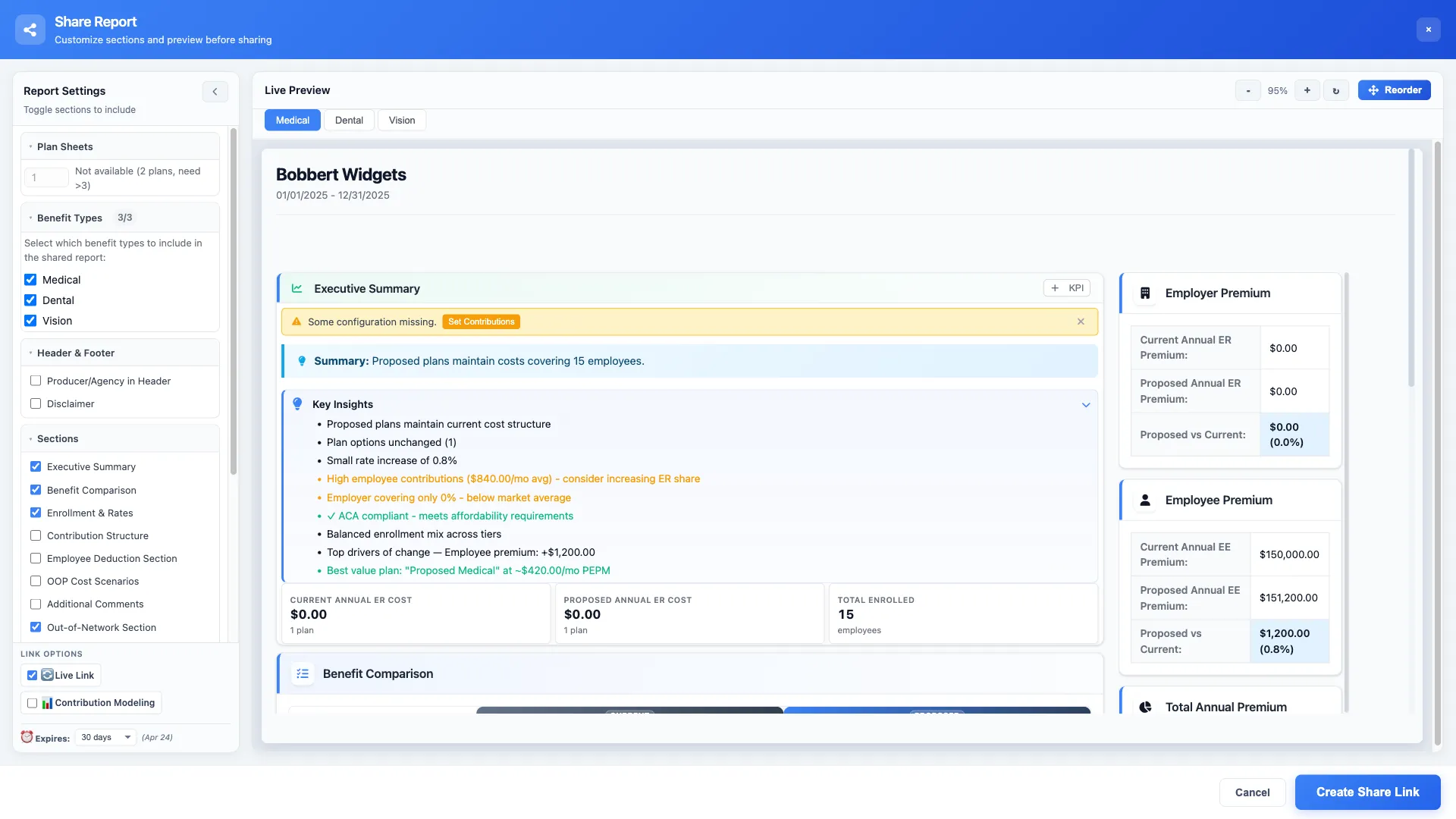
When you open the share modal, configure these settings thoughtfully:
Share Settings Checklist
Access Type
Public, email-required, or password-protected
Expiration
No expiration, specific date, or days from now
Permissions
View only, comment, or download enabled
Branding
Your logo, custom colors, footer text
Sharing with Team Members vs. Clients
Internal and external sharing serve different purposes:
Internal Team Sharing
Share with colleagues for review before client delivery:
- Edit access: Allow team members to modify the proposal
- Comment access: Colleagues can annotate without changing content
- View access: Read-only for stakeholder review
Set up internal review workflows where proposals require approval before external sharing.
Client Sharing
External links should typically be more restricted:
- View-only access (no editing)
- Optional download permissions for PDFs
- Feedback collection through structured forms
- Engagement tracking enabled
Tracking Engagement
Shared links provide analytics that inform your follow-up strategy:
- View count: How many times was the link accessed?
- Time spent: Which sections got the most attention?
- Plan views: Which specific plans did they examine?
- Device info: Desktop vs. mobile viewing
- Download activity: Did they save PDF exports?
Using Engagement Data
Best Practices for Professional Sharing
Personalize the Message
Don't just send a bare link. Include context in your email:
- Brief summary of what they'll find
- Highlight key recommendations
- Clear call-to-action (schedule call, provide feedback)
- Your contact information for questions
Test Before Sending
Open the link yourself before sharing:
- Verify all plans display correctly
- Check branding appears as expected
- Confirm access controls work
- Test on mobile if clients might view there
Version Control
When you need to update a shared proposal:
- Same link, updated content: For minor corrections
- New link, notify viewers: For significant changes
- Versioned naming: Keep track of what changed when
Share Proposals in One Click
BART's share modal generates secure, trackable links instantly. Control access, brand your presentation, and see who's engaged.
Handling Feedback from Shared Links
The best sharing tools include feedback mechanisms:
- Comment threads: Clients can ask questions on specific plans
- Rating systems: Quick preference indicators
- Selection tools: Mark plans as "interested" or "not interested"
- Form submissions: Structured feedback collection
Feedback captured in the tool is more actionable than scattered email threads.
Security Considerations
Benefits data includes sensitive information. Treat sharing security seriously:
- Rate confidentiality: Carrier rates may be confidential—restrict access appropriately
- Employee data: Census information requires careful protection
- Audit requirements: Some clients require access logs for compliance
- Link hygiene: Revoke old links when relationships end
Integrating with Your Workflow
Make sharing a natural part of your proposal process:
- Build proposal: Complete your analysis and comparison
- Internal review: Share with team for quality check
- Generate client link: Configure access and branding
- Send with context: Email link with personalized message
- Monitor engagement: Track viewing activity
- Follow up: Use engagement data to guide conversation
- Iterate: Update based on feedback, reshare if needed
Result: Faster Decisions, Better Impressions
Professional sharing tools do more than deliver information—they demonstrate competence. Clients notice when you send polished, interactive presentations versus email attachments.
More importantly, engagement tracking gives you intelligence. Instead of wondering if they reviewed your proposal, you know exactly what captured their attention.