Team Collaboration for Benefits Brokers: Organization & Multi-User Workflows
Solo brokers can work however they want. Teams need structure. When multiple people touch the same clients, cases, and proposals, chaos follows without proper organization tools and workflows.
The Multi-User Challenge
Benefits agencies face coordination problems that solo brokers never encounter:
- Duplicate work: Two people build proposals for the same client
- Version conflicts: Which proposal is the current one?
- Knowledge silos: Only one person knows how a client's setup works
- Access confusion: Who can see what? Who can edit what?
- Onboarding friction: New hires struggle to understand existing cases
These problems compound during busy periods. Renewal season becomes a coordination nightmare without proper tooling.
The Cost of Poor Coordination
A duplicated proposal costs hours of wasted labor. A version conflict can result in presenting outdated information to clients. Knowledge silos create single points of failure when team members leave. The cost of coordination failure far exceeds the cost of proper tooling.
Organization Structure Basics
Start with the fundamental building blocks:
The Organization
Your organization is the top-level container—typically your agency or brokerage. Everything else lives within it:
- Team members (users)
- Clients and their cases
- Shared libraries (plans, templates)
- Settings and branding
Teams Within Organizations
Larger agencies need sub-groups. Teams let you organize by:
- Function: Sales team, service team, analytics team
- Geography: Northeast region, West Coast, etc.
- Specialization: Large group team, small group team, voluntary benefits
- Client segment: Enterprise accounts, mid-market, small business
Example Organization Structure
Role-Based Access Control
Not everyone needs access to everything. Define roles that match job functions:
Common Role Types
- Admin: Full access to organization settings, billing, user management
- Manager: Can see all cases, reassign work, view reports
- Broker: Full access to assigned clients and cases
- Analyst: Can view and edit data, limited client communication
- Support: View access for client service, limited editing
- Viewer: Read-only access for stakeholders
Permission Categories
Roles typically control access across these areas:
- Clients: View, create, edit, delete, reassign
- Cases: View, create, edit, share, archive
- Proposals: View, create, edit, send to clients
- Libraries: View shared library, add to library, edit library
- Team: View members, invite users, manage roles
- Settings: Branding, integrations, billing
Role Permission Matrix Example
| Permission | Admin | Broker | Analyst | Support |
|---|---|---|---|---|
| View all clients | Yes | Assigned | Yes | Assigned |
| Create proposals | Yes | Yes | Yes | No |
| Share with clients | Yes | Yes | No | No |
| Manage team | Yes | No | No | No |
Shared Resources
Teams benefit from shared assets that anyone can leverage:
Shared Plan Library
Instead of each broker maintaining their own plan templates, create a team-wide library:
- Standard carrier plans everyone uses
- Curated by designated librarians
- Versioned with effective dates
- Quality-controlled before publishing
Individual brokers can still maintain personal favorites, but the shared library provides a consistent foundation.
Template Library
Share proposal templates, email templates, and presentation formats:
- Branded templates matching agency standards
- Approved messaging for common scenarios
- Starting points that new hires can customize
Client Assignment
Clear ownership prevents confusion:
- Primary owner: Main point of contact for the client
- Secondary access: Backup coverage, collaboration
- Team visibility: Managers can see all team clients
Workflow Coordination
Beyond access control, teams need workflow coordination:
Case Handoffs
When work transfers between team members:
- Clear status indicators (in progress, ready for review, needs revision)
- Assignment notifications
- Context notes explaining current state
- Activity history showing what's been done
Review Workflows
Quality control before client delivery:
- Proposals flagged as "ready for review"
- Manager approval before external sharing
- Revision requests with specific feedback
- Approval history for compliance
Notification Management
Keep the right people informed without overwhelming everyone:
- Assignment notifications for your clients only
- Mention notifications when colleagues tag you
- Deadline reminders for upcoming renewals
- Activity digests for managers (daily/weekly summaries)
Built for Teams
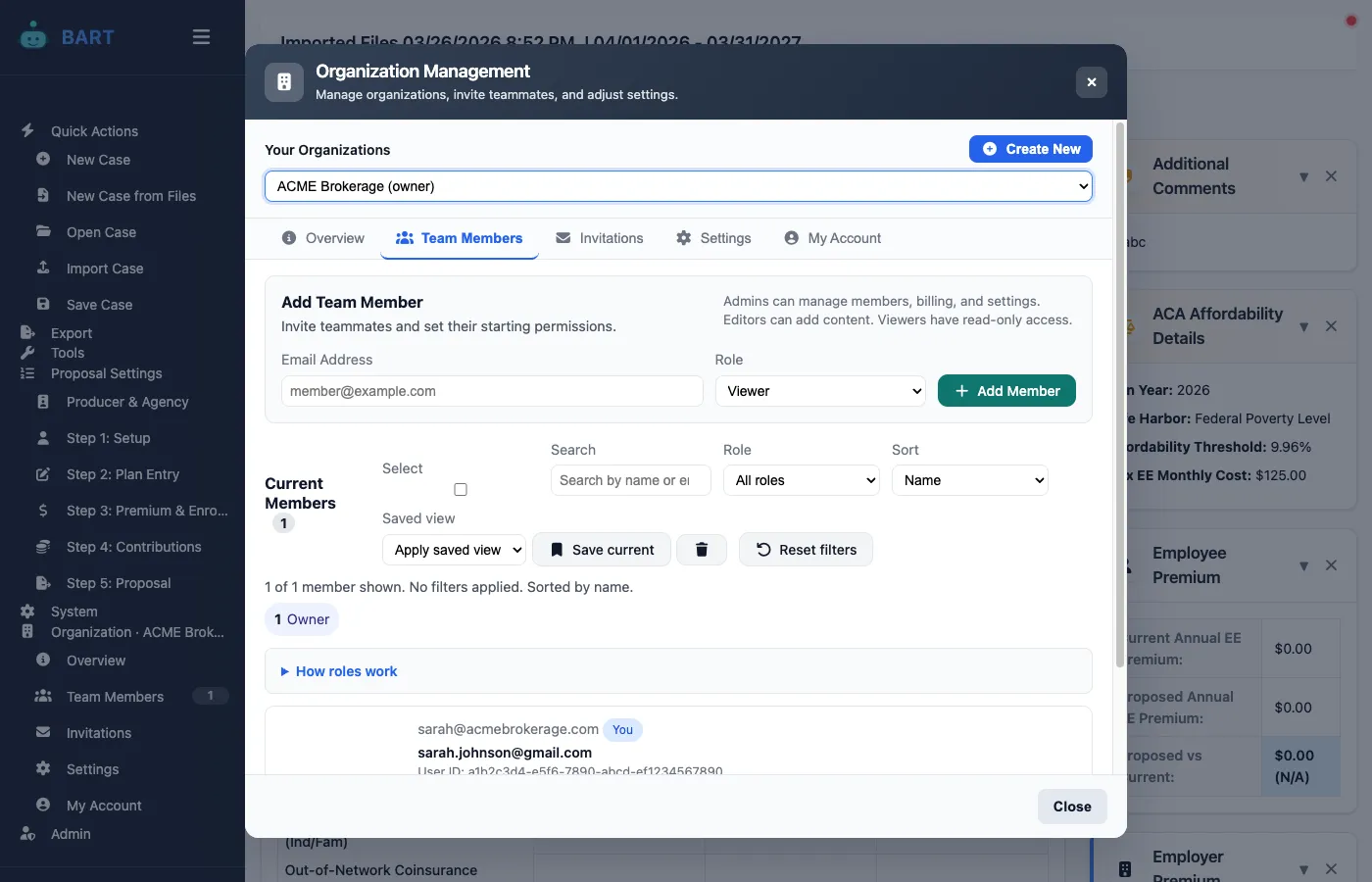
BART's organization features let you manage teams, control access, and share resources efficiently. Scale your agency without scaling your chaos.
Onboarding New Team Members
New hires should become productive quickly:
Account Setup
- Admin invites new user via email
- User creates account and joins organization
- Admin assigns role and team membership
- System grants appropriate permissions
Initial Access
What new team members should see immediately:
- Shared plan and template libraries
- Assigned clients (if any)
- Recent team activity for context
- Help documentation and training resources
Gradual Permission Expansion
Start new team members with limited access, expanding as they demonstrate competence:
- Week 1: View access to shadow experienced brokers
- Week 2-3: Edit access with review requirements
- Month 2+: Full broker access for assigned clients
Activity Tracking and Reporting
Managers need visibility into team activity:
Activity Logs
Track key actions for accountability and debugging:
- Who created/edited which proposals
- When cases were shared with clients
- Client engagement metrics by team member
- Login and access patterns
Performance Metrics
Aggregate data helps identify coaching opportunities:
- Proposals created per broker
- Average time from quote to proposal
- Client engagement rates by broker
- Renewal conversion rates
Handling Team Changes
People leave, roles change, teams reorganize:
Departing Team Members
- Reassign clients: Transfer ownership before deactivation
- Preserve history: Activity logs remain for compliance
- Revoke access: Immediate deactivation when appropriate
- Export if needed: Some data may need to transfer with the person
Role Changes
- Promotions: Expand permissions appropriately
- Team transfers: Update team membership, preserve client relationships
- Demotions: Reduce access while maintaining work history
Security Considerations
Multi-user environments require security attention:
- Strong authentication: Require strong passwords, consider SSO
- Session management: Automatic logout after inactivity
- Access reviews: Periodic audits of who has access to what
- Data export controls: Limit bulk export capabilities
- Audit trails: Immutable logs for compliance
Scaling Your Team Structure
As your agency grows, your structure should evolve:
Solo → Small Team (2-5)
- One organization, basic roles
- Shared library for consistency
- Clear client ownership
Small Team → Agency (5-20)
- Add team structure by function or region
- Formalize review workflows
- Implement activity reporting
Agency → Enterprise (20+)
- Multiple teams with managers
- Complex permission hierarchies
- Integration with HR/identity systems
- Compliance and audit requirements
Result: Coordinated Growth
Proper team organization isn't bureaucracy—it's infrastructure. When everyone knows their role, can access what they need, and understands the workflow, the agency can grow without proportional growth in confusion.
The agencies that scale successfully invest in organization tools early. Retrofitting coordination into an already-chaotic environment is much harder than building it right from the start.