Scenario Manager
Fork a case, model a strategy, compare the impact, and adopt the option you choose — without changing the original while you work.
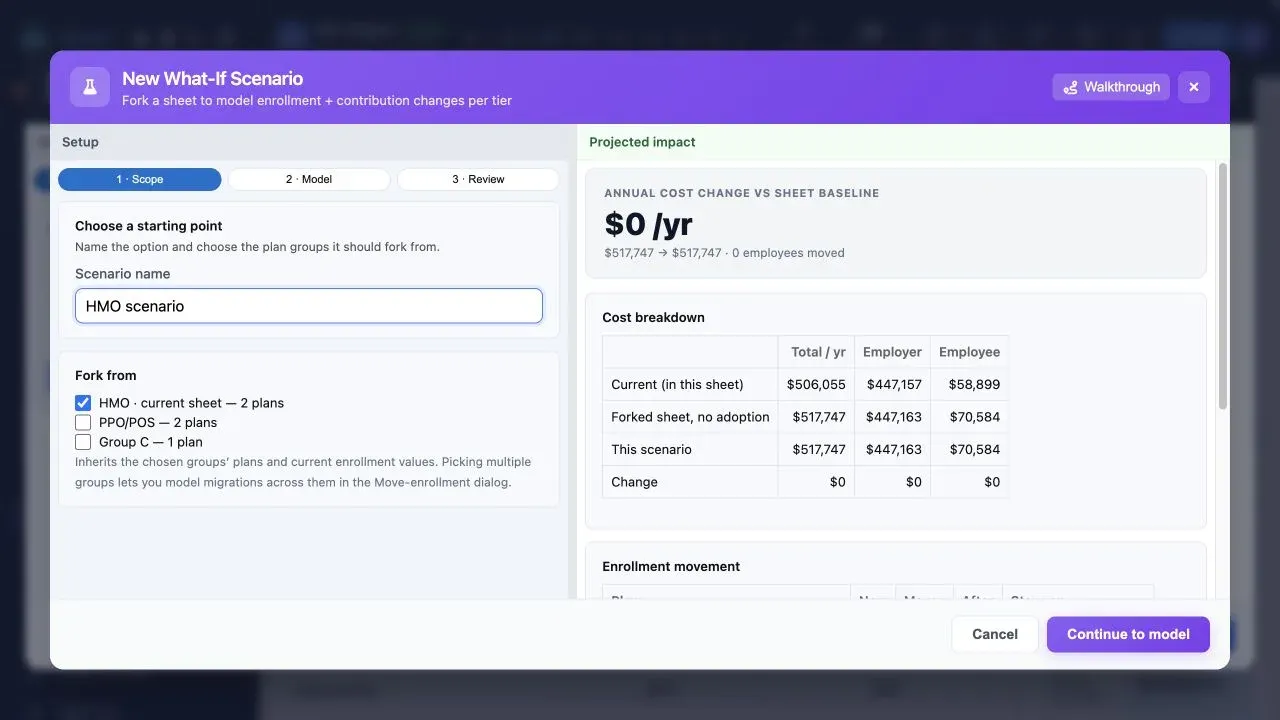
Why Scenario Manager?
Work on a safe copy
Start from the groups and plans you choose. Your live case remains unchanged while you test the option.
Scope each alternative
Fork one plan group or several, so a medical change does not accidentally rewrite every benefit line in the case.
Model plan and enrollment moves
Adjust contribution settings and enrollment movement, then see the cost impact beside the scenario baseline.
Compare the decision clearly
See annual total, employer, and employee costs together before deciding which strategy becomes the recommendation.
Adopt deliberately
Bring the selected scenario back into the case only when you are ready. The other alternatives stay available for comparison.
Carry the strategy forward
Use the selected option in proposal financials, projections, and client presentation work without rebuilding the case.
From option to recommendation
Name the scenario and choose the plan groups it should fork from. The selected plans and enrollment values become its baseline.
Test contribution changes, plan choices, and enrollment moves while the impact panel keeps employer and employee totals in view.
Review the difference against the baseline. When the recommendation is settled, adopt it into the case and use it in the proposal.
Ready to Try This Feature?
Start your free proposal today and see the difference.
✓ No credit card required • ✓ First proposal free • ✓ Cancel anytime