How AI Parses PDF Benefit Documents: A Technical Guide
Ever wondered how modern software extracts benefit data from carrier PDFs automatically? Let's look under the hood at the AI and machine learning that powers automated document parsing.
The Challenge: Carrier PDFs Are a Mess
Anyone who's worked with benefit documents knows the problem: every carrier uses different formats, layouts, and terminology. Some challenges include:
- Inconsistent layouts: Tables, columns, nested structures vary widely
- Varied terminology: "Deductible" vs "Annual Deductible" vs "Individual Deductible"
- Image-based PDFs: Scanned documents with no text layer
- Complex tables: Merged cells, multi-line headers, footnotes
- Multiple plan types: Medical, dental, vision in different formats
Traditional OCR (Optical Character Recognition) can extract text, but it doesn't understand context or structure. You end up with a wall of text that still requires manual sorting and categorization.
The Solution: Multi-Stage AI Pipeline
Modern document parsing uses a sophisticated multi-stage pipeline that combines several AI technologies:
Stage 1: Document Classification
The first step is identifying what type of document you're dealing with:
- Rate sheet (carrier pricing)
- Summary of Benefits and Coverage (SBC)
- Benefit summary
- Census file
- Invoice/billing statement
This classification uses machine learning models trained on thousands of carrier documents. The model looks at visual layout patterns, text positioning, and common phrases to categorize the document.
Technical Detail: Document Classification
Modern classifiers combine layout analysis with extracted text to identify document types. Important fields still need source review before they inform a recommendation.
Stage 2: Layout Analysis
Once we know the document type, we need to understand its structure:
- Where are the tables located?
- What's the header row vs data rows?
- Are there merged cells or nested tables?
- What's the reading order (columns vs rows)?
This is where tools like Google Document AI excel. Document AI uses computer vision to detect tables, forms, and key-value pairs even in complex layouts.
Stage 3: Text Extraction and OCR
For text-based PDFs, extraction is straightforward. But many carrier documents are scanned images or have image elements. Modern OCR engines handle:
- Multiple fonts and sizes
- Rotated or skewed text
- Low-resolution scans
- Handwritten annotations
- Text over backgrounds or watermarks
Stage 4: Entity Recognition
This is where the magic happens. The system needs to identify specific benefit data points:
- Plan identifiers: Plan names, carrier names, group numbers
- Costs: Deductibles, copays, coinsurance, out-of-pocket maxes
- Coverage details: In-network vs out-of-network, benefit limits
- Premiums: Rates for different tier levels
Named Entity Recognition (NER) models trained specifically on benefit documents can identify these fields even when terminology varies:
Example: Deductible Recognition
The model recognizes all of these as "Individual Deductible":
- "Annual Deductible (Individual): $1,500"
- "Ind. Ded.: $1,500"
- "Member Deductible $1,500"
- "Individual Deductible $1,500 per year"
Stage 5: Data Validation and Normalization
Raw extracted data needs cleaning and validation:
- Format normalization: "$1,500" → 1500 (numeric)
- Unit conversion: "20%" → 0.20 (decimal)
- Consistency checks: Does family deductible ≥ individual deductible?
- Missing data detection: Flag incomplete extractions
- Outlier detection: Does $15 deductible seem wrong? (probably $1,500)
Stage 6: Confidence Scoring
Not all extractions are equally reliable. The system assigns confidence scores to each field:
- High confidence: Clear, unambiguous extraction
- Needs review: Likely correct but worth checking against the source
- Manual review: Uncertain or incomplete extraction
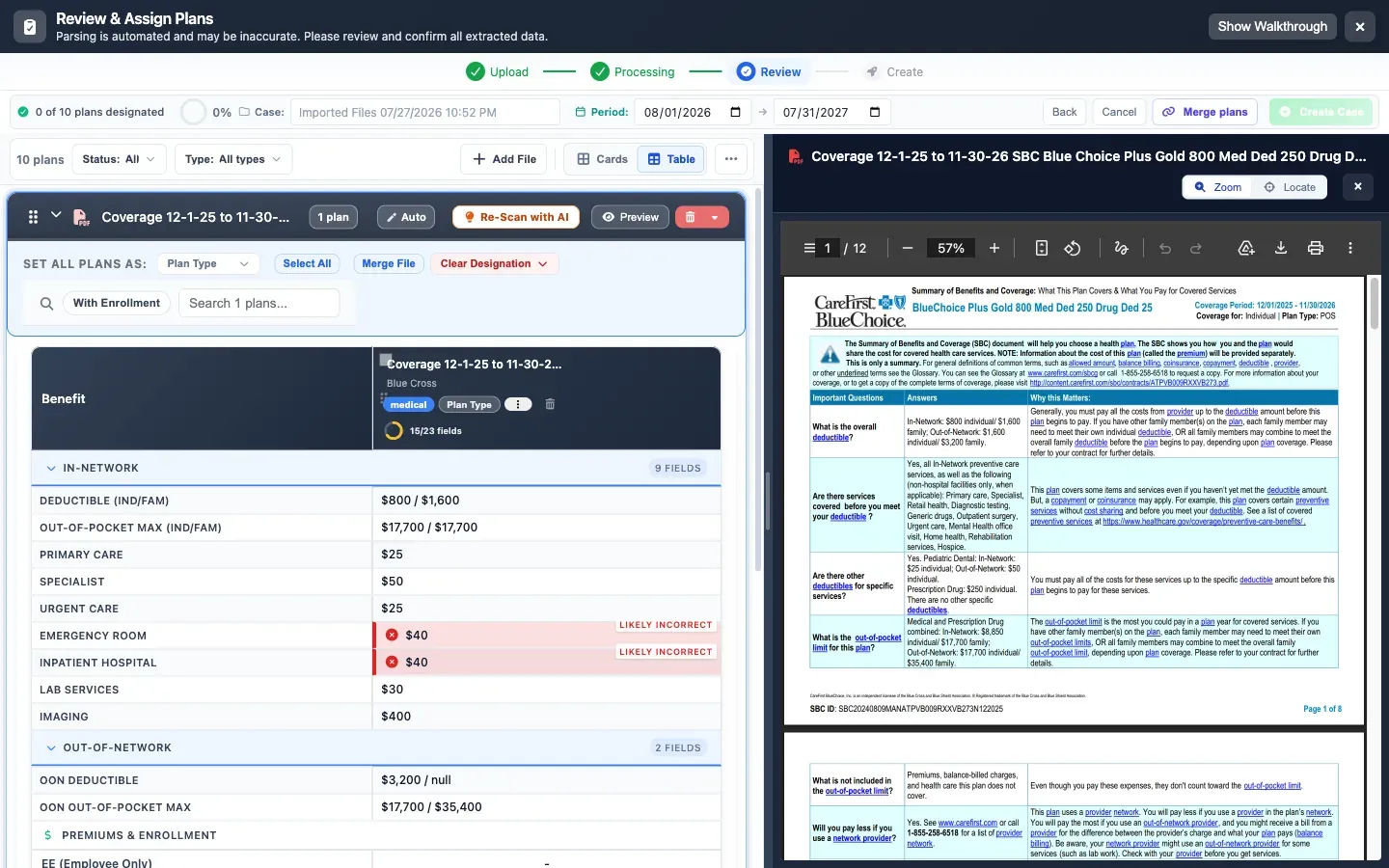
Low-confidence fields are flagged for human review, ensuring accuracy while still saving time on the majority of data entry.
Real-World Example: Parsing a Rate Sheet
Let's walk through parsing a typical medical rate sheet:
Step-by-Step Process
- 1. Upload: User uploads carrier PDF (3 pages, tables with pricing)
- 2. Classification: System identifies it as a medical rate sheet for review
- 3. Layout detection: Finds 2 tables—one for plan details, one for rates
- 4. Text extraction: Extracts all text including table contents
- 5. Entity recognition: Identifies 4 plans with deductibles, copays, OOP maxes
- 6. Rate extraction: Maps employee/spouse/child/family rates to each plan
- 7. Validation: Checks that family rates > employee rates (passes)
- 8. Review signals: Use source review to confirm fields that need attention
- 9. Display: Shows extracted data in structured form for review
The case remains reviewable alongside the original source document.
The Technology Stack
Modern parsing systems typically combine several technologies:
Google Document AI
Provides enterprise-grade OCR, layout analysis, and form parsing. Trained on billions of documents across industries. Key features:
- Specialized parsers for forms, invoices, contracts
- Custom model training for specific document types
- High accuracy on complex tables and layouts
- Handles scanned documents and low-quality images
Custom ML Models
While Document AI handles general parsing, custom models trained on benefit-specific documents improve accuracy:
- Entity recognition: Identifying benefit-specific terms
- Classification: Recognizing carrier-specific formats
- Validation: Applying industry knowledge (e.g., typical deductible ranges)
Business Rules Engine
Hard-coded logic handles domain-specific validation:
- Family deductible should be 2-3x individual
- Coinsurance should be between 0-100%
- Out-of-pocket max should be ≥ deductible
- Copays are typically round numbers ($20, $30, $50)
Why Source Review Still Matters
Parsing organizes document information for review; it should not replace confirming the original source material.
- Standard documents: confirm plan values against the source before approval
- Complex tables: review fields that need attention before using them
- Structured spreadsheets: verify imported fields and calculations in the case
Important Note on Accuracy
No parsing system should be treated as a final authority. Professional workflows retain validation and review so approved client materials reflect confirmed source data.
Challenges and Limitations
Despite impressive technology, some challenges remain:
Novel Document Formats
When a carrier introduces a completely new layout, accuracy may drop until the model is retrained. Most systems handle this by:
- Flagging low-confidence extractions for review
- Learning from corrections (active learning)
- Periodic model retraining with new document types
Handwritten Content
While OCR handles handwriting better than ever, it's still less reliable than printed text. Mixed documents with handwritten notes can be tricky.
Ambiguous or Missing Data
Sometimes documents simply don't contain all the data you need, or information is ambiguous. No AI can extract data that isn't there.
The Future: Continuous Improvement
Parsing accuracy improves over time through:
Active Learning
When users correct extracted data, those corrections become training data for future improvements. The system literally gets smarter with use.
Transfer Learning
New advances in foundation models (like GPT-4 Vision) can be applied to document parsing, bringing general intelligence to specific benefit document challenges.
Expanded Training Sets
As more documents are processed, models can be retrained on larger, more diverse datasets, improving accuracy across all carrier formats.
Experience AI-Powered Parsing Yourself
BART brings carrier documents into a reviewable case so you can confirm important plan data against the source files. Try it free on your first proposal.
Practical Tips for Best Results
To get the most from automated parsing:
- Use high-quality PDFs: Native PDFs are better than scans when possible
- Upload complete documents: Don't crop or split multi-page documents
- Review flagged fields: Pay attention to low-confidence extractions
- Provide feedback: Correct errors to help the system improve
- Keep originals: Always maintain source documents for reference
Conclusion: AI as Your Data Entry Assistant
Automated document parsing isn't magic—it's sophisticated AI that handles the tedious work of reading and extracting benefit data. While it's not perfect, it:
- Reduces repeated manual transcription work
- Maintains high accuracy through validation and review workflows
- Continuously improves with use
- Frees brokers to focus on analysis and client service
For benefits brokers, that means less time typing and more time adding value for clients. And in an increasingly competitive market, that efficiency advantage matters.