Benefit Comparison Software vs Excel: Which is Better for Brokers?
Excel has been the go-to tool for benefit comparisons for decades. But is it still the best choice? Let's compare manual spreadsheets with modern automation software.
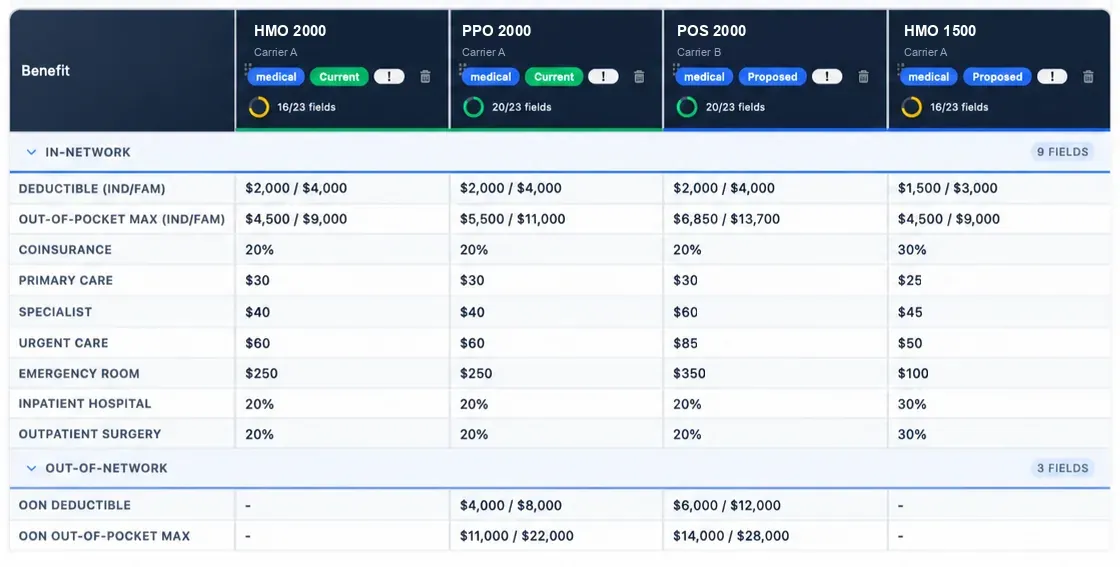
The Excel Era: Why Spreadsheets Became the Standard
For years, Excel was the only practical option for creating benefit comparisons. It offered:
- Complete control over layout and formatting
- Flexibility to handle any data structure
- No additional software costs (most offices already had Excel)
- Familiarity—everyone knows how to use Excel
But as benefit plans have become more complex and client expectations have increased, the limitations of Excel are becoming harder to ignore.
The Hidden Costs of Excel
While Excel itself is inexpensive, the time costs add up quickly:
1. Manual Data Entry
Every carrier PDF or rate sheet requires manual typing. For a proposal with 3 carriers and 4 plan types each, that's potentially 50+ data points to enter by hand.
2. Formula Maintenance
Contribution calculations, census aggregations, and cost comparisons all require complex formulas. One wrong cell reference and your entire proposal could be incorrect.
3. Formatting and Cleanup
Making proposals look professional in Excel is tedious. Adjusting column widths, setting up print areas, and ensuring everything fits on the page takes significant time.
4. Error Checking
With manual entry and complex formulas, you need to carefully verify every number. The stakes are high—errors can cost clients thousands of dollars.
5. Revisions
When clients request changes, you often need to rebuild sections of your spreadsheet or carefully update formulas without breaking things.
Total Time Investment
The manual workload can be substantial, especially when source files, formulas, and revisions live in separate spreadsheets.
Modern Benefit Comparison Software: The Automation Alternative
Purpose-built software addresses Excel's limitations with automation and intelligent features:
Automated Data Extraction
BART brings carrier PDFs and Excel files into one reviewable case, where plan details can be checked alongside their source material.
- Upload carrier rate sheets → Data extracted automatically
- Upload SBC documents → Review plan data with the source files
- Upload census files → Employee data imported
Built-In Calculation Logic
Pre-built calculation engines handle contribution modeling, cost projections, and census aggregations automatically.
- No formulas to write or maintain
- Instant recalculation when you change any number
- Built-in validation to catch potential errors
Professional Templates
Co-branded proposal templates eliminate formatting work:
- Add your logo and colors once
- Consistent professional output every time
- Export as interactive HTML or branded PDF
Rapid Revisions
Develop a revised recommendation without rebuilding disconnected spreadsheets:
- Copy existing scenarios with one click
- Real-time updates across all sections
- Version history for reference
Time with Automation Software
The value of an automated workflow is a clear, reviewable case and less repeated formatting work—not a promised fixed completion time.
Head-to-Head Comparison
| Feature | Excel | Comparison Software |
|---|---|---|
| Data Entry | Manual (1-2 hrs) | Automated (5-10 min) |
| Calculations | Manual formulas | Built-in engines |
| Error Risk | High | Low (validated) |
| Formatting | 1+ hour per proposal | Automatic templates |
| Revisions | 45-60 min | 5-10 min |
| Learning Curve | Minimal (familiar) | 1 day to proficiency |
| Cost | $0 software | ~$30/month |
| Total Time | Manual entry, formula work, and formatting | Varies by case and source review |
ROI Analysis: When Does Software Pay for Itself?
Let's do the math for a typical benefits broker:
Example Scenario
- Proposals per month: 4
- Workflow benefit: less repeated data entry and formatting
- Workflow benefit: fewer disconnected steps between source review and delivery
- Broker hourly value: $100/hour (conservative)
- Monthly value of saved time: $2,400
- Software cost: $30/month
- Net monthly benefit: $2,370
- Annual ROI: 7,800%
Even if you only do 2 proposals per month, the software pays for itself in saved time.
When Excel Still Makes Sense
To be fair, there are scenarios where Excel remains the better choice:
- You only create 1-2 proposals per year
- You have extremely custom formatting requirements
- You need to analyze data in ways standard software doesn't support
- Budget constraints make any monthly cost prohibitive
Making the Transition
If you decide to try automation software, here's how to make the switch smooth:
- Start with one proposal: Most tools offer a free first proposal. Test it on a real client project.
- Compare side-by-side: Create the same proposal in Excel and the software. See the time difference yourself.
- Keep Excel as backup: For the first month, keep your Excel templates available. You'll quickly find you don't need them.
- Train your team: If you have multiple people creating proposals, schedule a training session together.
Try Both Approaches Risk-Free
Download our free Excel template OR try BART's automated software. See which approach works better for your workflow.
Conclusion: The Right Tool for the Right Job
Excel is a powerful, flexible tool that will always have a place in benefit analysis. But for repetitive proposal creation, automation software offers clear advantages:
- A shared, reviewable workflow for routine proposals
- Dramatically reduced error rates
- Professional, consistent output
- Fast ROI that pays for itself many times over
The question isn't whether automation software is better—it's whether the time savings and error reduction are worth a small monthly investment. For most brokers creating more than a few proposals per month, the answer is a clear yes.