Plan Library Organization: Build a Reusable Benefits Database
Every renewal season, brokers re-enter the same carrier plans dozens of times. A well-organized plan library eliminates this redundancy, letting you pull proven plan configurations into new proposals in seconds instead of hours.
The Hidden Cost of Re-Entry
Consider how many times your team enters the same Blue Cross PPO plan details in a typical month. Every group with similar demographics gets similar carrier options, yet each proposal starts from scratch.
This isn't just inefficient—it introduces errors. Manual re-entry of deductibles, copays, and rate tables creates opportunities for typos. One wrong digit in an out-of-pocket maximum can undermine an entire presentation.
Time Savings Calculation
If entering a single plan takes 5 minutes, and you use that plan in 20 proposals per month, that's 100 minutes per plan. With 50 common plans, you're looking at 83+ hours/month of avoidable data entry—over two full work weeks.
What Belongs in Your Plan Library
A plan library should contain any plan configuration you expect to use more than once:
- Standard carrier plans: The common PPO, HMO, and HDHP options from major carriers in your region
- Popular voluntary benefits: Dental, vision, life, and disability plans you frequently quote
- Client templates: Customized plans for large clients with recurring renewals
- Benchmark plans: Reference plans for comparison (e.g., typical small group medical)
- Historical plans: Prior-year versions for renewal comparisons
Organization Strategies That Scale
A plan library is only useful if you can find what you need quickly. Structure matters more than quantity.
Primary Organization: By Plan Type
Start with broad categories that match how clients think about benefits:
- Medical: HMO, PPO, EPO, HDHP/HSA, POS
- Dental: DHMO, DPPO, Indemnity
- Vision: Full-service, discount plans
- Life: Basic, supplemental, AD&D
- Disability: STD, LTD
- Voluntary: Accident, critical illness, hospital indemnity
Secondary Organization: By Carrier
Within each type, organize by carrier. This lets you quickly pull all Cigna options or compare equivalent UnitedHealthcare plans:
Example structure
Tertiary: By Effective Date or Region
For larger operations, add date or geographic tags. Rates change quarterly or annually, and plans vary by state. Tag plans with their effective period and applicable regions.
Naming Conventions That Prevent Confusion
Ambiguous plan names create matching problems. "Gold Plan" could mean anything. Use systematic naming that encodes key attributes:
Recommended naming pattern
This naming approach lets you search efficiently. Looking for all HDHPs? Search "HDHP". Need 2026 Anthem options? Search "Anthem_2026".
Template vs. Instance Plans
Distinguish between template plans (reusable starting points) and instance plans (specific to a client/quote):
- Templates: Generic plans without client-specific rates. Use these as starting points.
- Instances: Plans with actual quoted rates for a specific group. These live in case files, not the master library.
Templates include plan design (deductibles, copays, coinsurance, network) but leave rate fields empty or use placeholder values. When you add a template to a proposal, you then populate rates from the actual quote.
Keeping Your Library Current
Stale data defeats the purpose. Build maintenance into your workflow:
Quarterly Review
- Remove discontinued plans
- Update plan designs that changed
- Add new carrier offerings
- Archive outdated effective dates
Post-Renewal Cleanup
After major renewal cycles, review which plans you actually used. Plans you never selected are candidates for removal. Plans you frequently modified might need updated templates.
Carrier Communication
When carriers announce plan changes, update your library immediately. Don't wait for the first proposal that needs it—by then you'll be under deadline pressure.
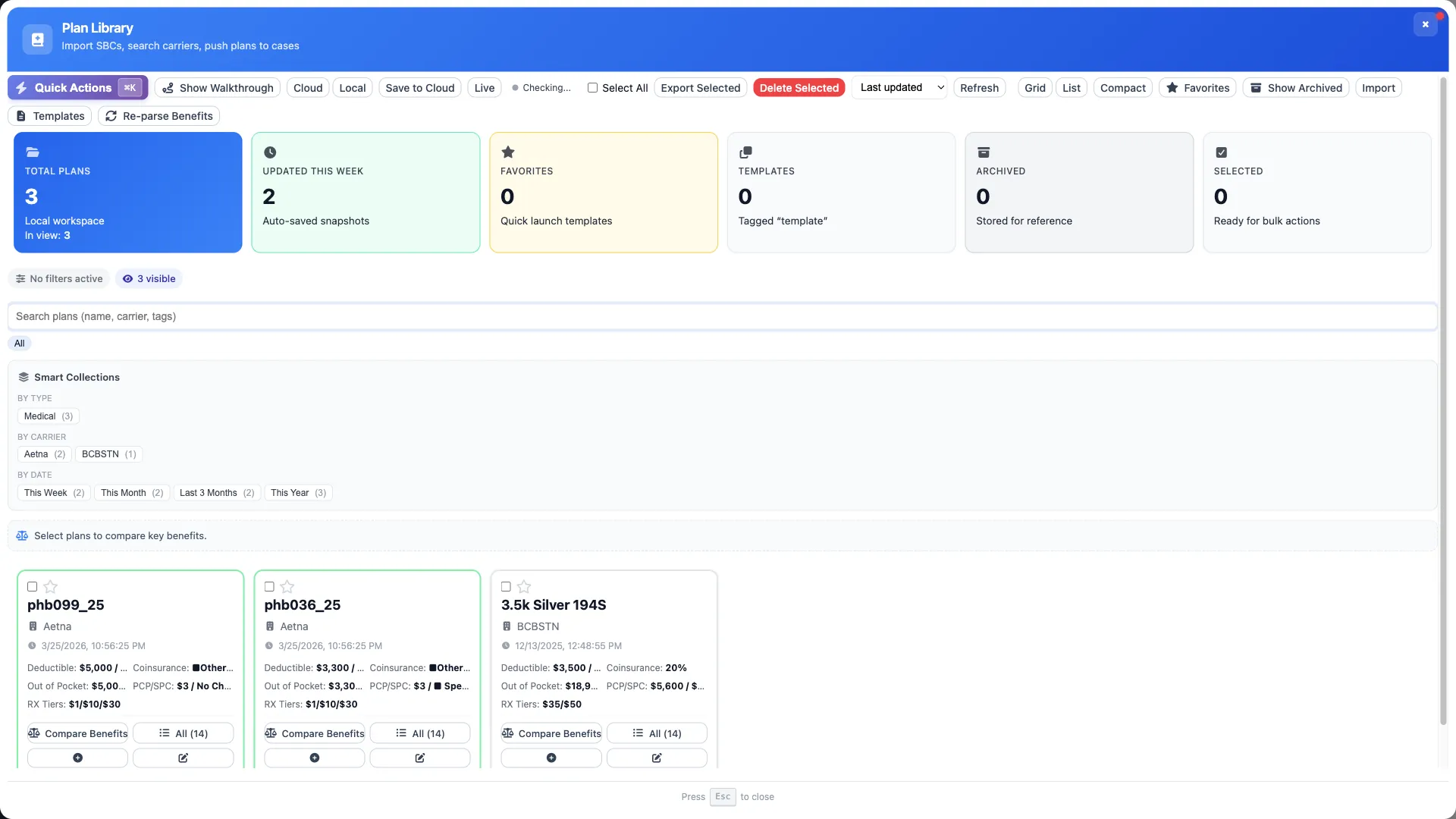
Smart Collections for Fast Access
Beyond static organization, use dynamic collections that filter plans based on criteria:
- Favorites: Your most-used plans for quick access
- Recently used: Plans added to proposals in the last 30 days
- By market: Small group plans under 50 lives vs. large group
- By cost tier: Budget, mid-range, premium options
- HSA-eligible: All qualified HDHPs
Stop Re-Entering Plans
BART's Plan Library stores your frequently used plans with cloud sync across devices. Build once, reuse everywhere.
Bulk Operations for Efficiency
Managing individual plans is tedious. Use bulk operations to maintain your library efficiently:
- Bulk import: Upload multiple plans from a spreadsheet
- Bulk tag: Apply categories to multiple plans at once
- Bulk archive: Move outdated plans out of active view
- Bulk export: Generate plan summaries for carrier negotiations
Integration with Proposal Workflow
A plan library should integrate seamlessly with your proposal creation process:
- Search or browse your library for relevant plans
- Add plans to your current proposal with one click
- Customize rates based on the actual quote
- Compare selected plans in your comparison grid
- Optionally save back if you created a new variant worth keeping
The key is minimal friction. If adding a plan from your library takes more than a few seconds, adoption suffers.
Team Sharing Considerations
In multi-broker agencies, plan libraries can be personal, shared, or both:
- Personal libraries: Your own curated set of frequently-used plans
- Team libraries: Standard plans everyone in the agency uses
- Read-only vs. editable: Control who can modify shared templates
Most agencies benefit from a curated team library managed by a designated person, with individuals able to add personal favorites.
Result: Faster, More Accurate Proposals
A well-maintained plan library transforms proposal creation from a data entry task into a plan selection task. Instead of typing the same deductibles for the hundredth time, you search, select, and move on.
The compounding benefit: as your library grows, so does your speed advantage. Brokers with mature plan libraries routinely build proposals 3-5x faster than those starting from scratch.